
The Zephyr Web Server, Now in C++: Classes for Embedded Hardware
A short follow-on from the Zephyr Thread web server guide, rebuilding the same project in C++ on the Seeed XIAO nRF52840, and adding the RGB LED and the on-die temperature sensor to show why classes suit Zephyr hardware so well.

In the previous guide we built a small web server in C on the Zephyr RTOS, running on a Seeed Studio XIAO nRF52840 and reachable over a Thread mesh. This is a short companion piece that answers a natural next question: what does the same project look like in C++, and is it worth the switch?
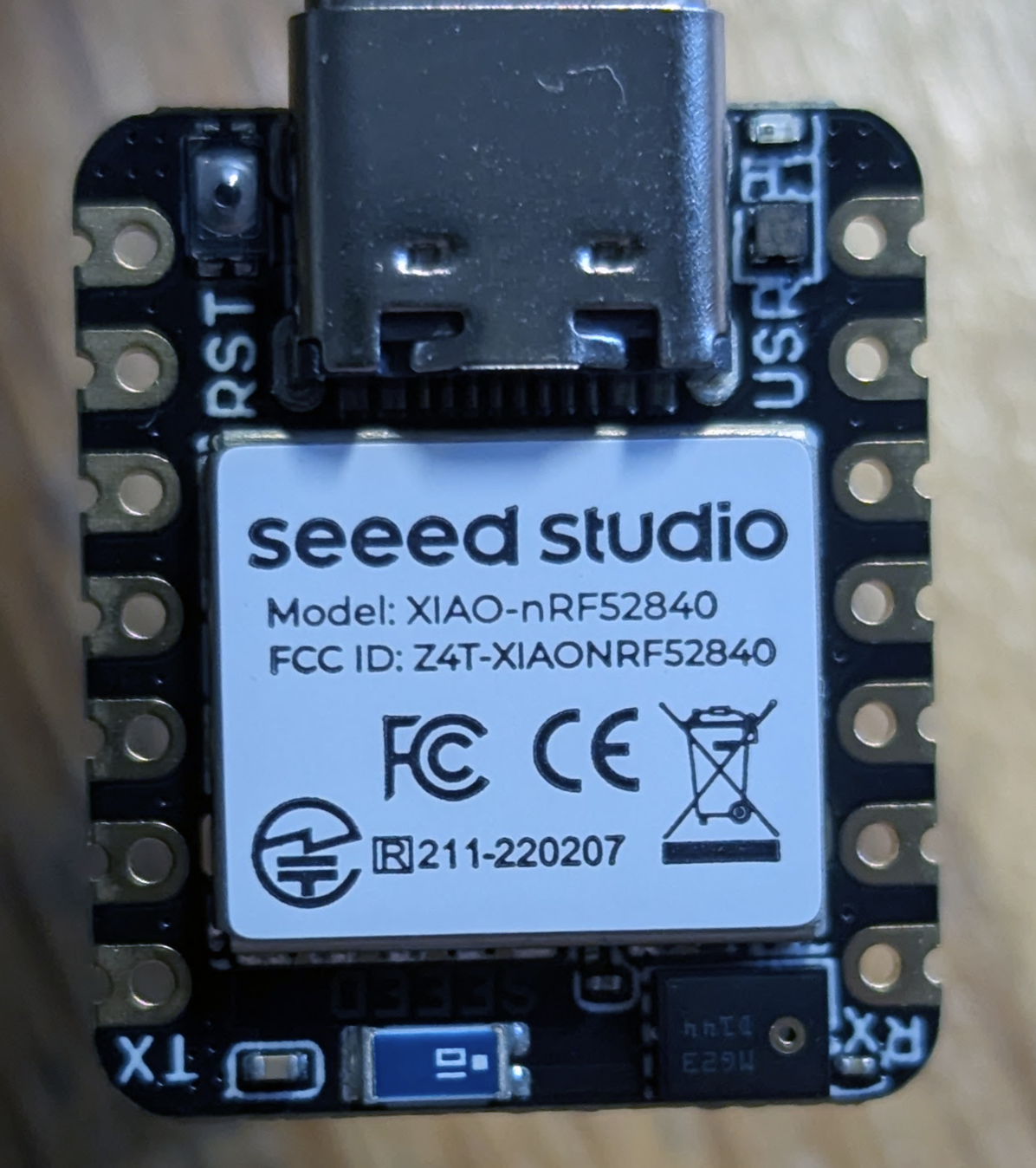
To make the comparison valid, the C++ version is not just a rename. We take advantage of the restructuring to drive two more pieces of hardware that the C version ignored, both of which are already on the board:
- The XIAO's user LED is an RGB LED: three separate active-low GPIOs (red on P0.26, green on P0.30, blue on P0.06), each with its own devicetree alias (
led0,led1,led2). The C version drove only the red channel. - The nRF52840 has an on-die temperature sensor, already enabled in the SoC devicetree, so it costs and no wiring. We will read it through Zephyr's generic sensor API and show the reading on the web page.
Everything else (the toolchain, the Thread border router, commissioning, and browsing to the device) is identical to the C guide, so this article does not repeat it. If you have the C project building and joining the mesh, this one is twenty minutes of work.
xiao_ble. The C++ language options in Kconfig occasionally gain new spellings between releases, so if a symbol below is rejected, check CONFIG_CPP and its friends in your tree's documentation first.What C++ gives you on Zephyr (and what it does not)
Zephyr is written in C, but it treats C++ as a first-class application language: every public header is wrapped in extern "C" guards, the build system compiles .cpp files with the matching cross-compiler, and the kernel runs your global constructors before main(). Turning it on is two lines of Kconfig.
The case for C++ here is modest but valid. In the C version, the LED's devicetree spec, its on/off state, and the page theme were file-scope globals, and any function in the file could modify any of them. That is fine at 200 lines. It stops being fine when the project grows, and the C++ version shows the alternative: each piece of hardware becomes an object that carries its own state, and the compiler enforces who may access/control it.
| C version | C++ version | |
|---|---|---|
| LED state | Two file-scope globals (led_on, dark) |
Private members of RgbLed and HttpServer |
| Hardware access | Any function can call gpio_pin_set_dt |
Only RgbLed::apply() touches the pins |
| Adding a second LED | Copy the globals and keep them in sync by hand | Construct another Led; composition is free |
| New sensor | New global device pointer + helper functions | New class, same shape as the others |
| Runtime cost | baseline | ~11 KB extra flash (measured below, including the sensor driver) |
What C++ does not get you here is any new capability: there is no C++-only Zephyr API, and the underlying calls (gpio_pin_set_dt, zsock_accept, sensor_sample_fetch) are exactly the ones from the C guide. The value is purely organisational.
CONFIG_CPP_EXCEPTIONS, CONFIG_CPP_RTTI), and most embedded C++ style guides agree with that default: exceptions need unwinding tables and unpredictable stack behaviour that small devices cannot afford. So our classes report failure with bool returns, not throw. The standard library is similarly tuned by sticking to what does not allocate.The project
Create a sibling of the C project, for example zephyrproject\een-zephyr-web-cpp, with the same three-file shape. Only the differences are called out here.
(.venv) PS C:\zephyr\zephyrproject\een-zephyr-web-cpp> tree /F .
Folder PATH listing
Volume serial number is 00000261 D2E8:0917
C:\ZEPHYR\ZEPHYRPROJECT\EEN-ZEPHYR-WEB-CPP
│   CMakeLists.txt
│   prj.conf
│
└───src
        main.cpp
Build Configuration (CMakeLists.txt)
The only change is the source file's extension, which is also what tells CMake to use the C++ compiler for it:
cmake_minimum_required(VERSION 3.20.0)
find_package(Zephyr REQUIRED HINTS $ENV{ZEPHYR_BASE})
project(een_zephyr_web_cpp)

target_sources(app PRIVATE src/main.cpp)
Project Configuration (prj.conf)
Take the prj.conf from the C guide unchanged, and add a few important lines for C++:
# --- C++ support ---
CONFIG_CPP=y                # compile and link C++ (runs global constructors too)
CONFIG_STD_CPP20=y          # C++20: designated initialisers become standard, not a GNU extension

# --- Hardware we touch (add to the existing GPIO line) ---
CONFIG_SENSOR=y             # for the on-die temperature sensor
CONFIG_CPP=y is the switch that matters. CONFIG_STD_CPP20 picks the language standard (Zephyr defaults to a much older one), and CONFIG_SENSOR=y pulls in the sensor subsystem and, through the devicetree, the nordic,nrf-temp driver for the die sensor.
There is one more addition in the full file below, which is a larger set of network buffer pools. That one earns its own explanation, so it is covered later under Sizing the network buffers below, as this problem only appeared when I built the C++ version. If you copy the full listing you already have it; if you are editing the C guide's file line by line, do not skip it, or the richer C++ page will fail to load.
The full prj.conf file is:
# --- C++ support ---
CONFIG_CPP=y                # compile and link C++ (runs global constructors too)
CONFIG_STD_CPP20=y          # C++20: designated initialisers become standard, not a GNU extension

# --- Networking core ---
CONFIG_NETWORKING=y
CONFIG_NET_IPV6=y
CONFIG_NET_TCP=y
CONFIG_NET_SOCKETS=y
CONFIG_POSIX_API=y

# --- Non-Volatile Storage (Required for OpenThread) ---
CONFIG_FLASH=y
CONFIG_FLASH_MAP=y
CONFIG_NVS=y
CONFIG_SETTINGS=y
CONFIG_SETTINGS_NVS=y

# --- 802.15.4 + Thread ---
CONFIG_NET_L2_OPENTHREAD=y
CONFIG_OPENTHREAD_FTD=y

# --- Shell, so we can commission onto the Thread network at runtime ---
CONFIG_SHELL=y
CONFIG_OPENTHREAD_SHELL=y
CONFIG_NET_SHELL=y

# --- Hardware we touch ---
CONFIG_GPIO=y               # for the RGB LED
CONFIG_SENSOR=y             # for the on-die temperature sensor

# --- Diagnostics ---
CONFIG_LOG=y

# --- Headroom: the Thread stack and TCP need RAM ---
CONFIG_MAIN_STACK_SIZE=4096
CONFIG_HEAP_MEM_POOL_SIZE=16384

# --- Shell paste headroom: the Thread dataset is a long single line ---
CONFIG_SHELL_CMD_BUFF_SIZE=512
CONFIG_SHELL_BACKEND_SERIAL_RX_RING_BUFFER_SIZE=512

# --- Give the device a routable (OMR) address via SLAAC ---
CONFIG_OPENTHREAD_SLAAC=y

# --- Network buffer pools (see "Sizing the network buffers" below) ---
# The stock pools (4 net_pkt, 16 net_buf data fragments) serve a small page,
# but the richer C++ page needs ~18 TX fragments and silently fails to send on
# the default 16. These larger pools give comfortable headroom.
CONFIG_NET_PKT_RX_COUNT=16
CONFIG_NET_PKT_TX_COUNT=16
CONFIG_NET_BUF_RX_COUNT=64
CONFIG_NET_BUF_TX_COUNT=64
dts/arm/nordic/nrf52840.dtsi in your Zephyr tree you will find the temp: temp@4000c000 node already marked status = "okay", so the driver builds as soon as CONFIG_SENSOR is on. Many peripherals are not so lucky and need a .overlay file to enable them; the die sensor is a gentle first taste of the sensor API, precisely because it needs none of that. On my system that is C:\zephyr\zephyrproject\zephyr\dts\arm\nordic\nrf52840.dtsi and the entry looks like:temp: temp@4000c000 { compatible = "nordic,nrf-temp";...}The web server (src/main.cpp)
Here is the full listing. Structurally it is the C program, but the state and behaviour have moved into four small classes: Led (one GPIO), RgbLed (three Leds composed into one device), DieThermometer (the sensor), and HttpServer (the socket, the buffers, and the page). The comments carry the C++-specific detail.
// src/main.cpp
// The Zephyr Thread web server from the C guide, restructured in C++.
// Same behaviour over the network, plus two hardware upgrades that show
// why classes suit Zephyr well:
// * the XIAO's RGB LED is driven as one RgbLed object composed of three
// Led objects (the C version used a lone gpio_dt_spec and two globals);
// * the nRF52840's on-die temperature sensor is wrapped in a small
// DieThermometer class and its reading is shown on the web page.
//
// LEARNING NOTES
// --------------
// Zephyr's headers are C, but every public header is wrapped in
// extern "C" guards, so including them from C++ "just works". The
// devicetree macros (GPIO_DT_SPEC_GET, DEVICE_DT_GET) also work unchanged.
// What C++ adds is a home for the state: in the C version, the LED spec,
// the on/off flag, and the theme flag were file-scope globals that any
// function could touch. Here each piece of hardware carries its own state
// and the compiler enforces who may touch it.
#include <zephyr/kernel.h>
#include <zephyr/logging/log.h>
#include <zephyr/drivers/gpio.h>
#include <zephyr/drivers/sensor.h> // generic sensor API: fetch + get channels
#include <zephyr/net/socket.h>
#include <string.h>
#include <stdio.h>
LOG_MODULE_REGISTER(web, LOG_LEVEL_INF);
#define HTTP_PORT 80
// ---------------------------------------------------------------------------
// Led: one GPIO LED. The constructor captures the devicetree spec; init()
// does the runtime checks. We keep construction and initialisation separate
// because global constructors run before Zephyr's driver init, so a
// constructor must not touch the hardware -- a classic embedded C++ rule.
// ---------------------------------------------------------------------------
class Led {
public:
explicit Led(const gpio_dt_spec &spec) : spec_(spec) {}
bool init()
{
if (!gpio_is_ready_dt(&spec_)) {
return false;
}
return gpio_pin_configure_dt(&spec_, GPIO_OUTPUT_INACTIVE) == 0;
}
// Logical on/off: the devicetree's GPIO_ACTIVE_LOW flag means Zephyr
// inverts the electrical level for us, exactly as in the C version.
void set(bool on)
{
gpio_pin_set_dt(&spec_, on ? 1 : 0);
on_ = on;
}
bool is_on() const { return on_; }
private:
gpio_dt_spec spec_;
bool on_ = false;
};
// ---------------------------------------------------------------------------
// RgbLed: composition. Three Led objects behave as one device with an
// on/off state and a current colour. Note there is no new Zephyr API here:
// the C++ is purely organisational, which is exactly the point.
// ---------------------------------------------------------------------------
class RgbLed {
public:
enum class Colour { Red, Green, Blue };
RgbLed(const gpio_dt_spec &r, const gpio_dt_spec &g, const gpio_dt_spec &b)
: red_(r), green_(g), blue_(b) {}
bool init() { return red_.init() && green_.init() && blue_.init(); }
void set(bool on)
{
on_ = on;
apply();
}
void toggle() { set(!on_); }
void next_colour()
{
colour_ = (colour_ == Colour::Red) ? Colour::Green
: (colour_ == Colour::Green) ? Colour::Blue
: Colour::Red;
apply();
}
bool is_on() const { return on_; }
const char *colour_name() const
{
switch (colour_) {
case Colour::Red: return "red";
case Colour::Green: return "green";
default: return "blue";
}
}
private:
// One private function is the only place that touches the pins, so the
// three channels can never disagree with the logical state.
void apply()
{
red_.set(on_ && colour_ == Colour::Red);
green_.set(on_ && colour_ == Colour::Green);
blue_.set(on_ && colour_ == Colour::Blue);
}
Led red_, green_, blue_;
Colour colour_ = Colour::Red;
bool on_ = false;
};
// ---------------------------------------------------------------------------
// DieThermometer: the nRF52840 has a temperature sensor on the die itself,
// already enabled in the SoC devicetree, so this costs no wiring at all.
// Zephyr's sensor API is two calls: fetch a sample, then read a channel.
// The reading comes back as a sensor_value (val1 integer part, val2 in
// millionths), which we expose in centi-degrees to avoid needing
// floating-point printf support in the libc.
// ---------------------------------------------------------------------------
class DieThermometer {
public:
DieThermometer() : dev_(DEVICE_DT_GET(DT_NODELABEL(temp))) {}
bool init() const { return device_is_ready(dev_); }
bool read(int &whole, unsigned ¢i)
{
if (sensor_sample_fetch(dev_) != 0) {
return false;
}
sensor_value v {};
if (sensor_channel_get(dev_, SENSOR_CHAN_DIE_TEMP, &v) != 0) {
return false;
}
whole = v.val1;
centi = static_cast<unsigned>(v.val2 / 10000);
return true;
}
private:
const device *dev_;
};
// ---------------------------------------------------------------------------
// HttpServer: owns the listening socket, the request/response buffers, and
// the page state (theme). It borrows the RgbLed and DieThermometer by
// reference: the server uses the hardware but does not own it. The buffers
// live inside the object -- and the object is created at namespace scope
// below -- so nothing large ever lands on the 4 KB main thread stack.
// ---------------------------------------------------------------------------
class HttpServer {
public:
HttpServer(RgbLed &led, DieThermometer &thermo)
: led_(led), thermo_(thermo) {}
bool start(uint16_t port)
{
server_ = zsock_socket(AF_INET6, SOCK_STREAM, IPPROTO_TCP);
if (server_ < 0) {
return false;
}
// In C++ the C-style designated initialiser needs its fields in
// declaration order; value-initialising and assigning sidesteps the
// issue entirely and reads just as clearly.
sockaddr_in6 addr {};
addr.sin6_family = AF_INET6;
addr.sin6_addr = in6addr_any;
addr.sin6_port = htons(port);
if (zsock_bind(server_, reinterpret_cast<sockaddr *>(&addr), sizeof(addr)) < 0) {
return false;
}
return zsock_listen(server_, 2) == 0;
}
// Accept one client at a time, forever: identical discipline to the C
// version, just wearing a member-function jacket.
void run()
{
while (true) {
int client = zsock_accept(server_, nullptr, nullptr);
if (client < 0) {
LOG_WRN("accept() failed");
continue;
}
handle_client(client);
}
}
private:
void handle_client(int client)
{
int len = 0;
while (len < (int)sizeof(req_) - 1) {
int n = zsock_recv(client, req_ + len, sizeof(req_) - 1 - len, 0);
if (n <= 0) {
break;
}
len += n;
req_[len] = '\0';
if (strstr(req_, "\r\n\r\n")) {
break;
}
}
const char *path = "/";
char *first_space = strchr(req_, ' ');
if (first_space) {
path = first_space + 1;
char *end = strpbrk(const_cast<char *>(path), " ?");
if (end) {
*end = '\0';
}
}
// Routing: the handlers are now one-line calls into the objects.
if (strcmp(path, "/toggle") == 0) {
led_.toggle();
} else if (strcmp(path, "/colour") == 0) {
led_.next_colour();
} else if (strcmp(path, "/theme") == 0) {
dark_ = !dark_;
}
int body_len = render_page();
int header_len = snprintf(header_, sizeof(header_),
"HTTP/1.0 200 OK\r\nContent-Type: text/html\r\n"
"Content-Length: %d\r\nConnection: close\r\n\r\n", body_len);
if (send_all(client, header_, header_len) == 0) {
send_all(client, body_, body_len);
}
zsock_close(client);
}
int render_page()
{
const char *state = led_.is_on() ? "ON" : "OFF";
const char *action = led_.is_on() ? "Turn OFF" : "Turn ON";
const char *theme = dark_ ? "dark" : "light";
const char *theme_action = dark_ ? "Light mode" : "Dark mode";
int t_whole = 0;
unsigned t_centi = 0;
bool t_ok = thermo_.read(t_whole, t_centi);
return snprintf(body_, sizeof(body_),
"<!DOCTYPE html><html data-theme=\"%s\"><head>"
"<meta name=\"viewport\" content=\"width=device-width, initial-scale=1\">"
"<title>XIAO nRF52840 (C++)</title>"
"<link rel=\"stylesheet\" href=\"https://derekmolloy.ie/assets/built/theme.css\">"
"</head><body class=\"dm\">"
"<h1>Hello from Zephyr (C++) on the XIAO nRF52840</h1>"
"<p>The <b>%s</b> user LED is currently <b>%s</b>. "
"Die temperature: <b>%d.%02u°C</b>.</p>"
"<form action=\"/toggle\" method=\"get\">"
"<button type=\"submit\" style=\"font-size:1.5rem;padding:0.6rem 1.4rem\">%s</button>"
"</form>"
"<form action=\"/colour\" method=\"get\">"
"<button type=\"submit\" style=\"font-size:1.5rem;padding:0.6rem 1.4rem;margin-top:0.6rem\">Next colour</button>"
"</form>"
"<form action=\"/theme\" method=\"get\">"
"<button type=\"submit\" style=\"font-size:1.5rem;padding:0.6rem 1.4rem;margin-top:0.6rem\">%s</button>"
"</form>"
"<p>Served by Zephyr (C++) over Thread. See ["
"<a href=\"https://derekmolloy.ie/\">derekmolloy.ie</a>]</p>"
"</body></html>",
theme, led_.colour_name(), state,
t_ok ? t_whole : 0, t_ok ? t_centi : 0,
action, theme_action);
}
static int send_all(int sock, const char *data, size_t len)
{
size_t sent = 0;
while (sent < len) {
int n = zsock_send(sock, data + sent, len - sent, 0);
if (n < 0) {
return -1;
}
sent += n;
}
return 0;
}
RgbLed &led_;
DieThermometer &thermo_;
bool dark_ = true;
int server_ = -1;
char req_[1024];
char body_[1024];
char header_[128];
};
// ---------------------------------------------------------------------------
// Wire the objects together at namespace scope. The constructors only copy
// devicetree specs and pointers (no hardware access), so it is safe for them
// to run before main(); all hardware work waits for the init() calls below.
// ---------------------------------------------------------------------------
static RgbLed rgb_led(GPIO_DT_SPEC_GET(DT_ALIAS(led0), gpios),
GPIO_DT_SPEC_GET(DT_ALIAS(led1), gpios),
GPIO_DT_SPEC_GET(DT_ALIAS(led2), gpios));
static DieThermometer thermometer;
static HttpServer server(rgb_led, thermometer);
int main(void)
{
printk("=== web server main() starting (C++) ===\n");
if (!rgb_led.init()) {
LOG_ERR("RGB LED not ready");
return 0;
}
if (!thermometer.init()) {
LOG_ERR("Die temperature sensor not ready");
return 0;
}
if (!server.start(HTTP_PORT)) {
LOG_ERR("Failed to start HTTP server");
return 0;
}
printk("=== HTTP server listening on port 80 ===\n");
LOG_INF("HTTP server listening on [::]:%d", HTTP_PORT);
server.run(); // never returns
return 0;
}
.clang-format sets BreakBeforeBraces: Linux). In practice that means the opening brace sits on its own line for function, class, and namespace definitions, but stays on the same line for control statements such as if, for, while, and switch, with else grouped as } else {. Indentation is a tab and lines run to 100 columns. None of this is required for your code to compile, but matching the framework keeps your git diffs clean and lets clang-format leave your code untouched. It is also why C++ here still reads a lot like the traditional C it grew from.spec_, on_, dark_, req_, and so on. This is a C++ convention rather than a Zephyr one (Zephyr's C code uses plain snake_case), and it earns its keep in two ways. First, it tells you at a glance that on_ is object state while a bare on is a local or a parameter, so a constructor can write Led(const gpio_dt_spec &spec) : spec_(spec) with no name clash and no need for this->. Second, it is deliberately a trailing underscore, not a leading one: C++ reserves identifiers that begin with an underscore followed by a capital letter, or that contain a double underscore anywhere, for the compiler and the standard library, so a leading _State can quietly collide with a reserved name. A trailing underscore is always safe. Pick one scheme and hold to it; the specific mark matters less than the consistency.A few C++-on-Zephyr details in that listing are worth pulling out, because each one is a small landmine if you meet it unprepared:
- Constructors must not touch hardware. Global C++ constructors run very early in Zephyr's boot, before you can rely on drivers being initialised. The pattern used by all three hardware classes is: constructor stores the devicetree spec or device pointer, and a separate
init()does the runtime*_is_readychecks frommain(). If you find yourself callinggpio_pin_configure_dtin a constructor, stop. - Designated initialisers behave differently. The C version initialised
sockaddr_in6with.sin6_family = …style designated initialisers. C++20 supports these, but only in declaration order, and mixing them with C headers can be brittle. Value-initialising with{}and assigning the fields is the boring, portable alternative. - Devicetree macros work unchanged.
GPIO_DT_SPEC_GET(DT_ALIAS(led0), gpios)produces a perfectly valid C++ initialiser, so the devicetree workflow from the C guide carries straight across. The three LED aliases used here (led0,led1,led2) come from the board's own devicetree file, where they are labelled Red, Green, and Blue. - Large buffers live in the object, and the object lives at namespace scope. The C version used function-
staticbuffers to keep 2 KB of scratch space off the 4 KB main stack. The C++ version gets the same effect more tidily: the buffers are members ofHttpServer, and the singleserverinstance is a namespace-scope static, so the memory is allocated in.bssat link time.
Building, and what it costs
The build command only changes in the project directory name:
(.venv) PS C:\zephyr\zephyrproject> west build -b xiao_ble een-zephyr-web-cpp
...
Memory region         Used Size  Region Size  %age Used
           FLASH:      398220 B       788 KB     49.35%
             RAM:      117396 B       256 KB     44.78%
        IDT_LIST:           0 B        32 KB      0.00%
Generating files from C:/zephyr/zephyrproject/build/zephyr/zephyr.elf for board: xiao_ble/nrf52840
Converted to uf2, output size: 796672, start address: 0x27000
Wrote 796672 bytes to zephyr.uf2
west build --pristine -b xiao_ble een-zephyr-web-cpp if you are using the same directory as the C project, as the build folder is currently configured for the C version and you will likely see many build errors.Flashing is the same double-tap button and copy process as before for the C version: put the board in its UF2 bootloader and copy build\zephyr\zephyr.uf2 onto the drive that appears.
(.venv) PS C:\zephyr\zephyrproject> copy .\build\zephyr\zephyr.uf2 I:\
Comparing against the C build from the previous guide (785,408 bytes of UF2 against 796,672 here), the C++ version costs roughly 11 KB of extra flash, and that figure includes the die-temperature sensor driver we added, not just the language switch. The C++ language support itself (with exceptions and RTTI off) is close to free. RAM use is essentially unchanged. On a 1 MB part running a full RTOS and a Thread stack, this is in the margin of noise: the decision between C and C++ on Zephyr is about code organisation and team choice, not resources.
Commissioning onto the Thread network, finding the OMR address, and browsing to the device are exactly as described in the C guide, so follow those sections unchanged. When the page loads you will see one addition: the die temperature, re-read on every refresh, plus a Next colour button that steps the LED through red, green, and blue. If the temperature reads a few degrees above your room, that is correct: it is the silicon's own temperature, warmed by the radio and CPU, not the air's.
In the same way as the previous guide (please note some values have been manually changed for privacy):
*** Booting Zephyr OS build v4.4.0-7043-g777ab585520e ***
[00:00:00.523,712] <inf> udc_nrf: Initialized
WARNING: Using a potentially insecure PSA ITS encryption key provider.
[00:00:00.542,846] <wrn> secure_storage: Using a potentially insecure PSA ITS en                                                                                 cryption key provider.
=== web server main() starting (C++) ===
=== HTTP server listening on port 80 ===
[00:00:00.543,334] <inf> web: HTTP server listening on [::]:80
[00:00:00.543,640] <inf> udc_nrf: SUSPEND state detected
[00:00:00.543,670] <inf> udc_nrf: RESUMING from suspend
[00:00:00.546,722] <inf> udc_nrf: SUSPEND state detected
[00:00:00.646,911] <inf> udc_nrf: Reset
[00:00:00.646,972] <inf> udc_nrf: RESUMING from suspend
[00:00:00.695,495] <inf> udc_nrf: Reset
uart:~$ ot dataset set active 0003000a0c0102f095020879662de063397cca0e080000630d
f03ba0d50510670d75504fb620c934464c639e1669b030d4edf553542d50414e2d463039350708fda5600f64860000041df15d9ae97a0c61983e80b805e9a7458080c0402adf77835060004001fffe0
Done
uart:~$ ot dataset active -x
0003000a0c0102f095020879662de063397cca0e080000630d
f03ba0d50510670d75504fb620c934464c639e1669b030d4edf553542d50414e2d463039350708fda5600f64860000041df15d9ae97a0c61983e80b805e9a7458080c0402adf77835060004001fffe0
Done
uart:~$ ot state
router
Done
uart:~$ ot ipaddr
fd5c:2f13:2208:1:1e70:3842:fd96:4248
fda5:600f:6486:0:0:ff:fe00:a800
fda5:600f:6486:0:ab3b:f7a5:f9e1:ca15
fe80:0:0:0:e05b:494c:6b17:b7f9
Done
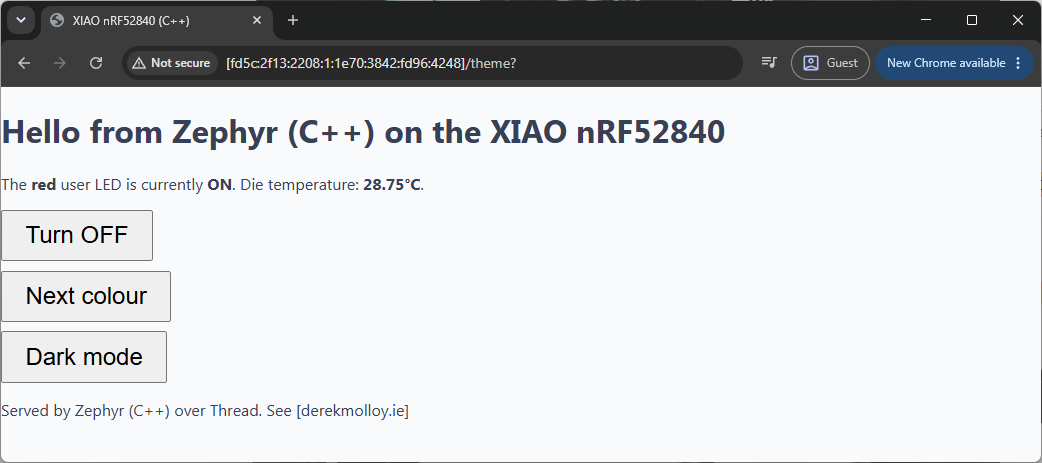
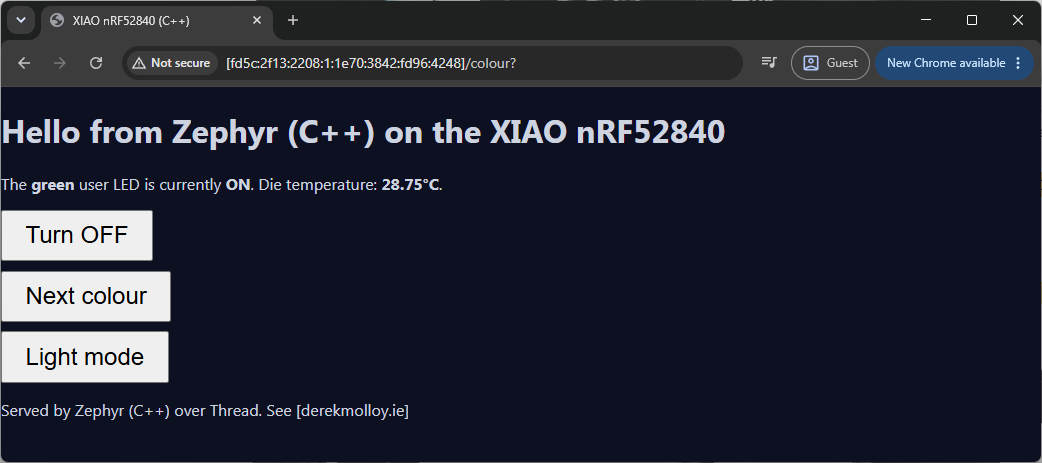
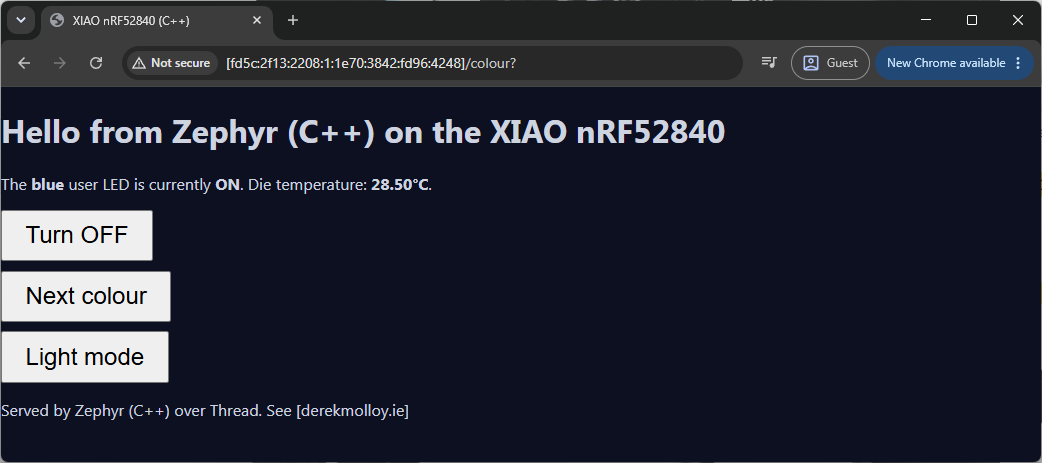
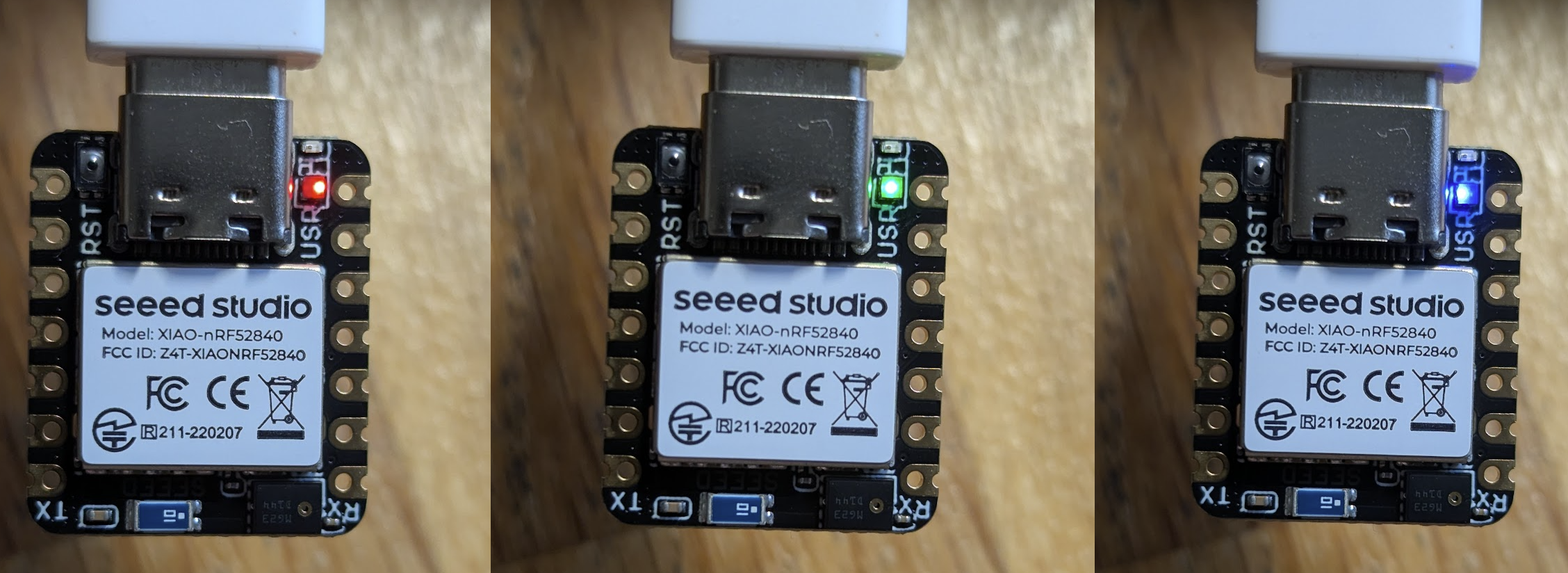
Use the first address in the list (the OMR address, fd5c:… or equivalent) to open the page in a browser. Clicking Turn ON / Turn OFF drives the LED, Next colour steps it through red, green and blue, and Light mode / Dark mode flips the theme, each click reloading the page with the die temperature refreshed:
Sizing the network buffers
If you build this from the C guide's prj.conf and forget the four CONFIG_NET_*_COUNT lines, you meet a puzzle that is worth walking through, because the way you corner it is more useful than the fix itself. Ask me how I know!
The board boots, joins the Thread network, and answers a ping. Yet the page never loads: a browser spins forever, and curl connects but reads zero bytes back. Nothing looks broken, which is exactly what makes it hard.The trick I used is to divide the problem in half at each step:
- Is it the code? Add a few
printkmarkers along the request handler. They all fire: the request is read, the page is rendered, and both the header and body are handed tozsock_send()successfully. The application logic is innocent. - Is it the radio or the mesh? Ping with a payload large enough to force 6LoWPAN fragmentation:
ping -6 -l 1000 <address>. It round-trips with zero loss. So the radio, fragmentation, and the border router all handle ~1 KB packets in both directions. - Is it the size? Temporarily shrink the response to a few bytes. It loads instantly. Restore the full page and it fails again. So the failure is real, it is size-dependent, and yet a 1000-byte ping works while a 933-byte HTTP response does not. The difference is not the network: it is TCP.
ping -6 -l 1000 <address> — -l sets the payload length, -6 forces IPv6.Linux / macOS (bash): ping6 -s 1000 <address>, or ping -6 -s 1000 <address> — here -s sets the size.A default ping carries only ~32 bytes, which fits in a single 802.15.4 frame and never exercises 6LoWPAN fragmentation. Pushing the payload past ~90 bytes forces the mesh to fragment and reassemble in both directions, and a clean round-trip at 500 and 1000 bytes is what proved the radio and the border router were healthy while HTTP still stalled.
For the HTTP side, prefer the real
curl.exe over PowerShell's Invoke-WebRequest. The latter is aliased to curl in PowerShell but is a different program: it tries to parse the reply as a DOM and halts with a -UseBasicParsing prompt on machines without Internet Explorer, which hides what actually came back. Windows 10 and 11 ship the genuine curl.exe, so use curl.exe -v -g -6 "http://[address]/" for an unambiguous view of the request and the raw bytes returned. If you must use Invoke-WebRequest, add -UseBasicParsing.That last contradiction points straight at Zephyr's network buffers. With CONFIG_NET_BUF_POOL_USAGE=y and CONFIG_NET_STATISTICS=y enabled temporarily, the net mem shell command shows the high-water mark of each pool after a request:
uart:~$ net mem
Fragment length 128 bytes
Network buffer pools:
Address         Total   Avail   MaxUsed Name
...
0x20000fe8      64      63      18      TX DATA (tx_bufs)
This is the problem – Sending the 933-byte page peaks at 18 TX data fragments (128 bytes each), held all at once while TCP keeps the segments unacknowledged in case they need retransmitting. Zephyr's default CONFIG_NET_BUF_TX_COUNT is 16. The response is two fragments too big to assemble, so it is dropped before it ever reaches the radio, and no error is raised to the application. A ping never touches this pool, and the smaller C page from the previous guide needs only about 14 fragments, so both slip under the limit. The more sophisticated C++ page, with its temperature line and extra button, is the first thing to cross it.
Raising the pools fixes it:
CONFIG_NET_PKT_RX_COUNT=16
CONFIG_NET_PKT_TX_COUNT=16
CONFIG_NET_BUF_RX_COUNT=64
CONFIG_NET_BUF_TX_COUNT=64
With the larger pools, net stats confirms the page now goes out cleanly, and even shows TCP doing its job (resent 933 is one clean retransmission of the page):
TCP bytes recv 5645     sent    12210   resent  933
TCP seg recv   108      sent    24      drop    0
TX DATA pool, at which point the send fails silently: the socket call succeeds, but the packet never leaves. If a device is reachable by ping and serves small replies but stalls on larger ones, reach for net mem first. The MaxUsed column is only populated when CONFIG_NET_BUF_POOL_USAGE=y, and net stats needs CONFIG_NET_STATISTICS=y; both are worth enabling while you diagnose, then removing to save flash.Securing what Thread stores at rest
Both the build and the boot log carry a build warning that is worth understanding rather than silencing:
<wrn> secure_storage: Using a potentially insecure PSA ITS encryption key provider.
OpenThread persists its operational dataset, which includes the network key, to flash through Zephyr's PSA secure storage. That store encrypts entries at rest, but the default key provider (CONFIG_SECURE_STORAGE_ITS_TRANSFORM_AEAD_KEY_PROVIDER_DEVICE_ID_HASH) derives the encryption key by hashing the device ID from the hardware-info API. A device ID is often readable, not unique, and guessable, so an attacker who can read the flash could reconstruct the key and recover your Thread credentials. For a bench project on your own network this is acceptable; for anything you deploy it is not.
There is no single switch that makes this secure, because the real strength here depends on the silicon. In rough order of increasing protection:
- Bind the key to hardware. Select the custom provider (
CONFIG_SECURE_STORAGE_ITS_TRANSFORM_AEAD_KEY_PROVIDER_CUSTOM) and implementsecure_storage_its_transform_aead_get_key()to derive the key from device-unique key material instead of the device ID. On the nRF52840 that material is a hardware unique key that Nordic'shw_unique_keylibrary provisions into a protected flash page and uses through the CryptoCell CC310. The encryption key then never exists as a guessable value. - Lock the flash. Enable the nRF52840's access-port protection (APPROTECT) so a debugger cannot read the flash back over SWD. This is the single most valuable step on a Cortex-M4 part: it costs nothing but a build option, and it is what keeps both the ciphertext and the hardware key page above out of reach. The two steps belong together.
- Move the keys out of the application entirely. The strongest option, a secure processing environment (Trusted Firmware-M) that holds keys in a partition the application CPU cannot touch, needs Arm TrustZone. The nRF52840 is a Cortex-M4 and has none, so this route means choosing a Cortex-M33 part such as the nRF5340 or nRF54L. If storage security is a hard requirement, that is a hardware decision to make early, not a Kconfig option to add late.
- Shrink the attack surface. The shell we enabled for commissioning also exposes
ot dataset active -x, which prints the network key in clear over the serial port. DropCONFIG_SHELL(or at leastCONFIG_OPENTHREAD_SHELL) from production builds so the credentials cannot simply be read out, encryption or not.
CONFIG_SECURE_STORAGE_ITS_TRANSFORM_AEAD_NO_INSECURE_KEY_WARNING=y removes the message but changes nothing about the risk. Reach for it only once you have consciously accepted the threat model, never just to quieten the build.Conclusion
- C++ on Zephyr is a two-line Kconfig change, and the entire C API (devicetree macros included) is usable from it directly.
- The benefit is structure, not capability: hardware state moves into objects (
Led,RgbLed,DieThermometer), and composition replaces the parallel globals of the C version. - The costs are small and measurable: about 11 KB of flash here, with exceptions and RTTI deliberately left off, and one new rule to respect (no hardware access in constructors).
- The sensor API pattern (
sensor_sample_fetchthensensor_channel_get) is the same for the die thermometer as for any I2C or SPI sensor you might wire to the XIAO's pads later, so theDieThermometerclass is a template for bigger things.
rgb_led, thermometer, and server) have their constructors run by the kernel before main(), as part of C++ static initialisation. At that moment you have almost no guarantees: the C++ standard does not define the order in which static objects across a program are constructed (the classic "static init order fiasco"), and Zephyr likewise does not promise that any given driver, clock, or GPIO controller is ready when your constructor fires. Worse, with exceptions switched off a constructor has no way to report that a device was not ready. It cannot return a value and it cannot throw, so a failed hardware access there either faults or, quietly, leaves the object in a broken state that surfaces as a mysterious bug much later.The fix is a two-phase pattern.The constructor does only trivial, hardware-free work: it captures the devicetree spec from
GPIO_DT_SPEC_GET or stores the pointer from DEVICE_DT_GET. Both of those are resolved at link time and touch nothing on the chip, so they are always safe. All the real work, the gpio_is_ready_dt() and device_is_ready() checks and the gpio_pin_configure_dt() calls, moves into an init() method that returns bool. Nothing calls init() until main() runs, by which point the kernel and its drivers are fully up, and a false return can be handled cleanly. If you remember one thing from porting C to C++ on Zephyr, make it this: constructors wire objects together, init() touches the hardware.The next guide aims to completes the triangle promised: the same web server, on this same board, over the same Thread mesh, but in Rust with Embassy and no RTOS at all.
Enjoy!

